
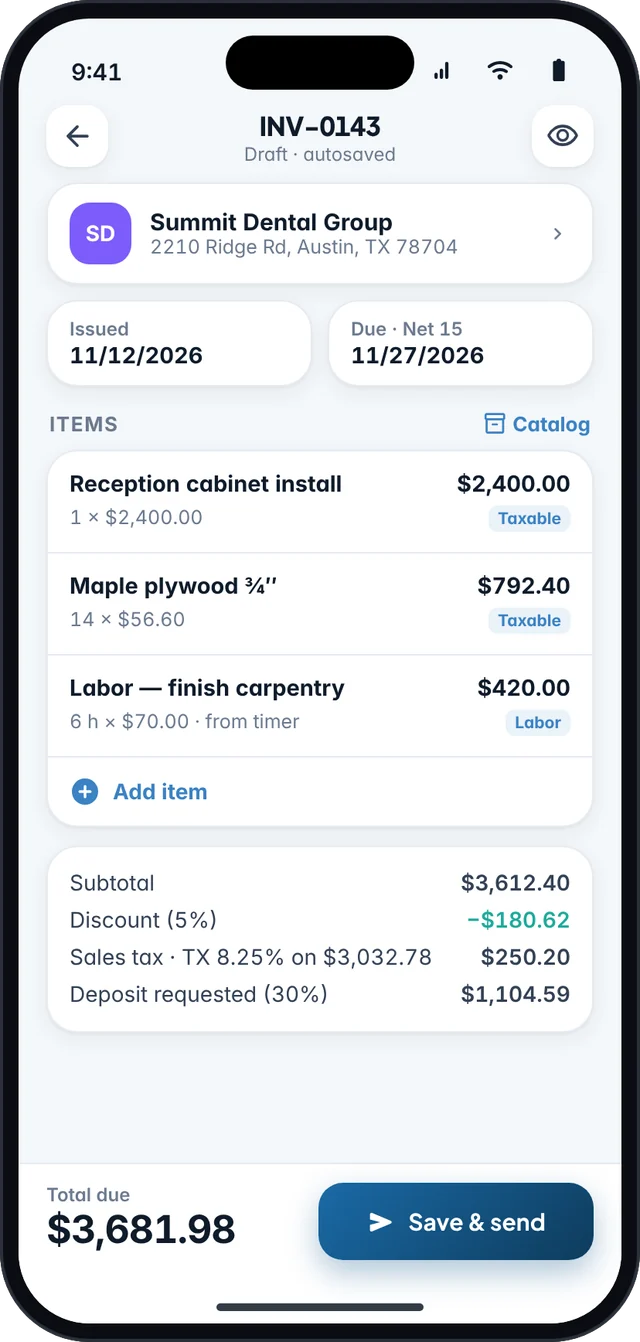
You do not need a desktop or an accounting login to bill a US client. You need a complete invoice, a clean PDF, and a way to send it. This guide walks through the fields that usually belong on a professional invoice, then shows how that workflow works in Fjordbill on Android.
What a professional US invoice should include
There is no single federal invoice format, but clients, bookkeepers, and (when relevant) state sales tax records all get easier when the document is complete. At minimum, include:
- Who you are: business name, address, phone or email, and a logo if you have one.
- Who you are billing: client name, billing address, and email.
- The document identity: the word “Invoice,” a unique invoice number, the invoice date, and a due date or payment terms (for example Net 15 or due on receipt).
- What you did: line items with a description, quantity, unit price, and amount. Add a job title or purchase-order number if the client uses one.
- The math: subtotal, discounts, shipping if any, sales tax if you collect it, deposits already paid, and the amount due.
- How to pay: the methods you actually accept, written clearly. Fjordbill can print a pay-now QR code that opens the payment link you provide (for example Venmo, PayPal, Cash App, Zelle, or Stripe).
If you issue estimates first, keep the same line items when you convert the estimate to an invoice so the client recognizes the work. See how to turn an estimate into an invoice.
Make the invoice in Fjordbill
- Add your business details onceOpen Settings and enter your name, address, logo, default payment terms, and default sales tax rate if you collect tax. You do not create a Fjordbill account.
- Add the clientSave the client so you are not retyping the name and address on the next job. You can also import a CSV if you are switching apps.
- Create the invoiceAdd line items from your catalog or type them in. Set quantities, rates, discounts, and a taxable flag on each line if you use US sales tax.
- Preview the PDFCheck the number, dates, tax total, and payment note. On the free plan the PDF includes a small “Made with Fjordbill” footer; Pro removes it and unlocks all templates.
- Share it from your own email or messagesFjordbill does not send the invoice from a Fjordbill inbox. You share the PDF (or a payment link, when you use one) with the app you already use.
- Record the paymentWhen the client pays, mark the invoice paid in full or in part. Those payments are what you later export for your accountant or into SovereignLedger.
Sales tax, 1099s, and records
Putting a tax line on an invoice is not the same thing as being required to collect sales tax. That depends on your state, the client’s location, and whether the service or goods are taxable. Read US sales tax on invoices and confirm with your state department of revenue.
Keep the invoice, the PDF, and the payment record. If you are paid as an independent contractor, those files are the backup for income that may also appear on a Form 1099-NEC. See 1099 income and invoice records.
Why do this on your phone
Fjordbill is built to work offline, so you can write the invoice on a job site with no signal and send it later. Your data stays on the device unless you share or export it. The free plan does not cap the number of invoices. If you also want receipts, mileage, and a Schedule C estimate, that is what SovereignLedger is for — and paid Fjordbill invoices can be exported into it.
Sources
- IRS, Am I required to file a Form 1099 or other information return?
- Tax Foundation, 2026 Sales Tax Rates by State
Reviewed 12 November 2026. Links go to the official or cited source; check the live page if a figure may have been updated since.
Frequently asked questions
Do I need an account to make an invoice in Fjordbill?
No. Fjordbill works without a Fjordbill account. Your invoices stay on your phone unless you share, export, or back them up.
Can I create an invoice without internet?
Yes. You can add the client, line items, and sales tax and preview the PDF offline. You only need a connection when you want to email or message the file.
Is the invoice maker free?
Yes. You can create unlimited invoices and estimates on the free plan. Free PDFs include a small “Made with Fjordbill” footer. Fjordbill Pro removes the footer and adds tools such as recurring invoices and a job timer.
Can I add US sales tax?
Yes. You can set one or more US sales tax rates and mark which lines are taxable. Whether you must collect tax is a legal question — see our sales tax guide and your state department of revenue.