

US sales tax, done right
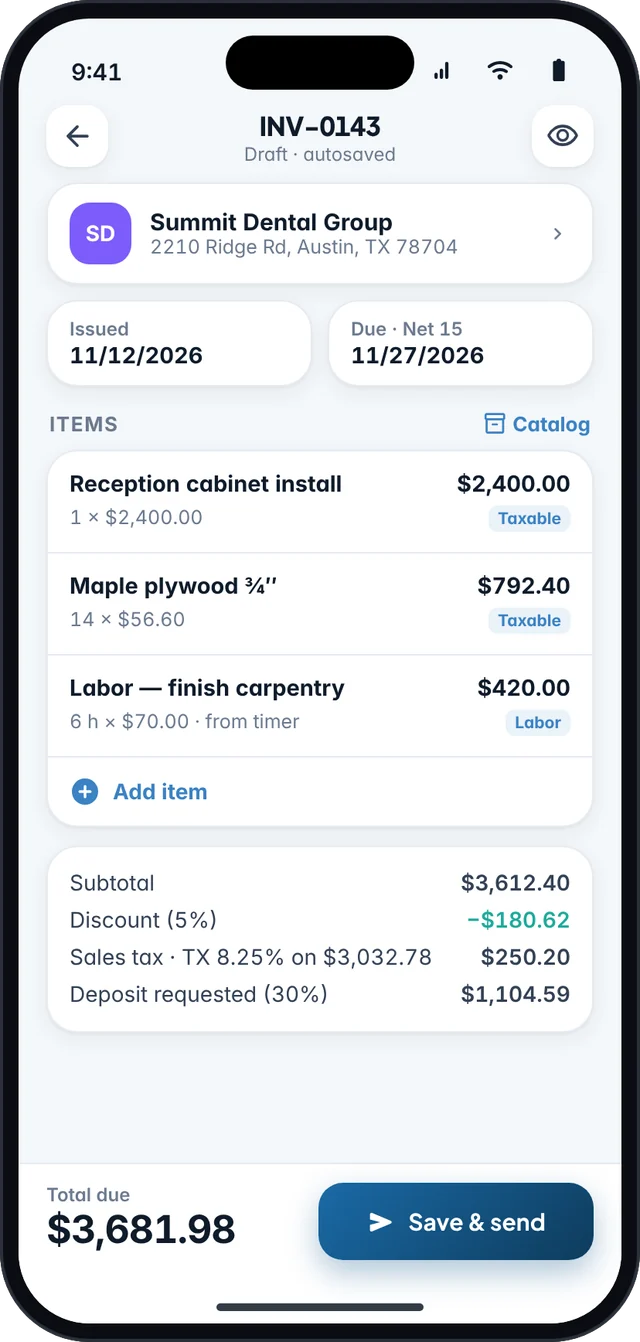
Mark each line taxable or not, use several rates, and apply discounts before tax. Every total is calculated in whole cents, so the numbers always add up.
Coming soon to iPhone & Android
Fjordbill is the invoice and estimate app for US freelancers and small businesses. Sales tax done right, polished PDFs, payment links and friendly reminders. It works offline, and you don’t need an account.
Everything you need to bill
Fjordbill covers the whole job: quote it, invoice it, collect it and hand the numbers to your bookkeeping. No desk required.
Mark each line taxable or not, use several rates, and apply discounts before tax. Every total is calculated in whole cents, so the numbers always add up.
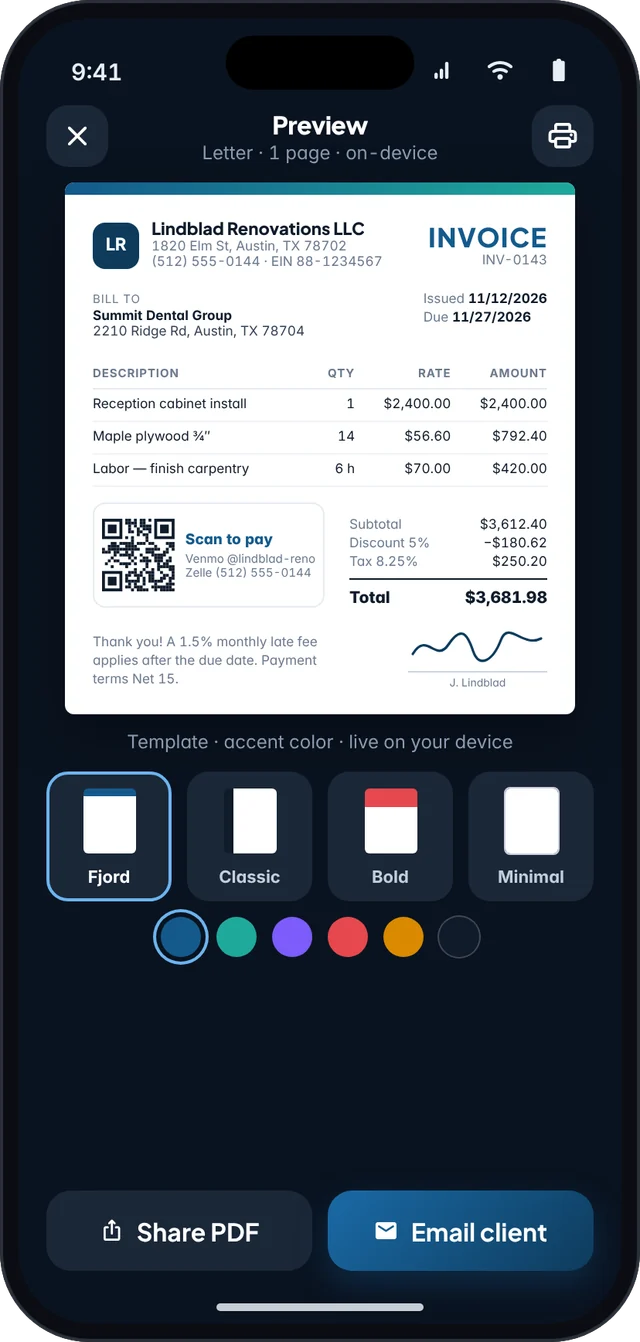
Choose from designed templates and accent colors, add your logo, and preview the exact PDF before you send it.
Put your own PayPal, Venmo or Cash App link on every invoice, with a QR code clients can scan, at no cost from Fjordbill. Or let clients pay by card or bank transfer into your own Stripe account.
Each client keeps their address, tax rate and payment terms, plus every estimate, invoice and payment in one place. Switching apps? Import your clients and items from a CSV file.
Fjordbill drafts a reminder before the due date, on the day, and when an invoice is late. You review it and send it with one tap from your own email or text.
Revenue by month and client, what’s unpaid and how late, and sales tax collected per rate. Export to CSV for your accountant, or as import-ready files for QuickBooks, Xero and Wave.
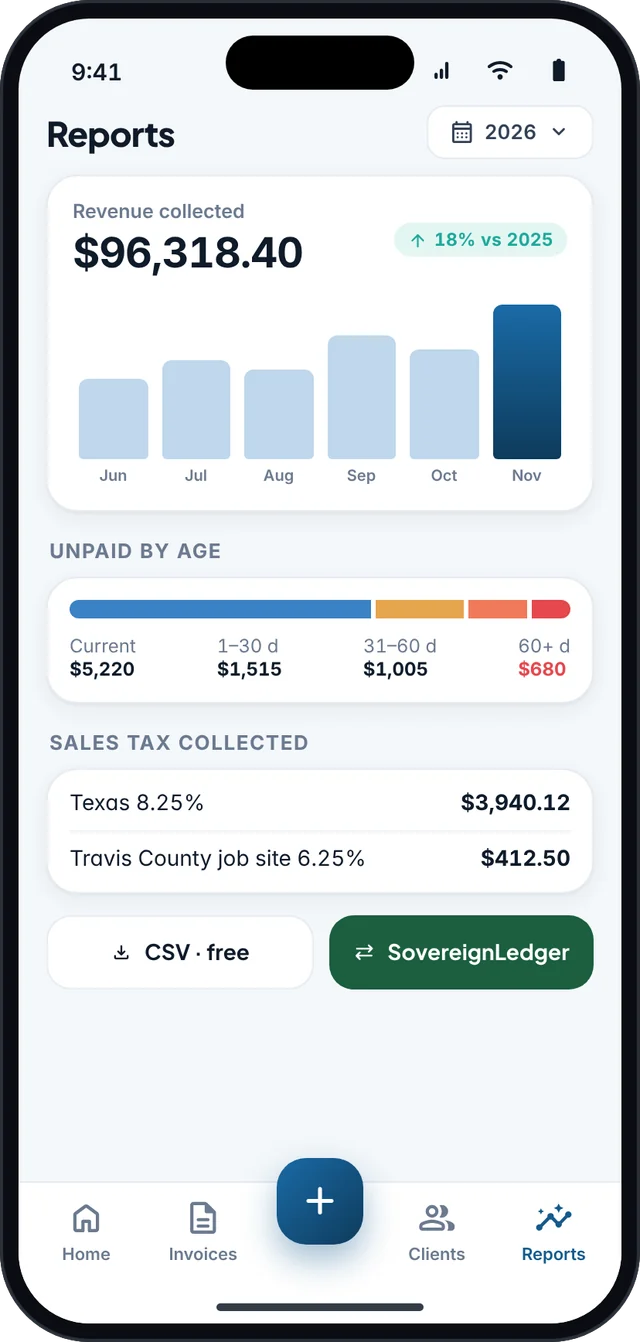
Export paid invoices in a format SovereignLedger, our receipt and Schedule C tax assistant, imports as income. Invoicing and bookkeeping stay in sync, without any typing.
Meet the tax companion
Card & bank payments Rolling out
Turn on online payments and every invoice gets a secure pay link: on the PDF, in your email and as a QR code. Your client opens it on any device, pays by card, Apple Pay, Google Pay or US bank account, and the invoice is marked paid in Fjordbill on its own. Available on every plan.
Online payments are rolling out after launch, on every plan. Online estimate approval and the client portal are Pro features. Card and bank details are entered on Stripe’s secure checkout and never reach Fjordbill. Stripe is a trademark of Stripe, Inc. Fjordbill is not affiliated with or endorsed by Stripe.
A small Fjordbill fee per payment, lower with Pro. It comes out of the payment, so your client pays exactly the invoice amount.
| Plan | Card payments | US bank (ACH) |
|---|---|---|
| Free$0 | 1.00% | 0.50%max $10 per payment |
| Pro Monthly$7.99 / month | 0.40% | 0.25%max $5 per payment |
| Pro Yearly$49.99 / year | 0.25% | 0% |
Plus Stripe’s standard fees, charged by Stripe to your Stripe account: 2.9% + 30¢ per card payment and 0.8% per US bank payment, capped at $5 (Stripe’s standard US pricing; your Stripe account shows the exact fee). Example: a $1,000 card payment on the Free plan costs $29.30 in Stripe fees and $10.00 in Fjordbill fees, so $960.70 lands in your Stripe balance. On Pro Yearly the Fjordbill fee is $2.50. Payment links you add yourself (PayPal, Venmo, Cash App) carry no Fjordbill fee.
New in Fjordbill 1.1
Recurring invoices, deposits, receipts and a year-end summary, built into the same simple app.
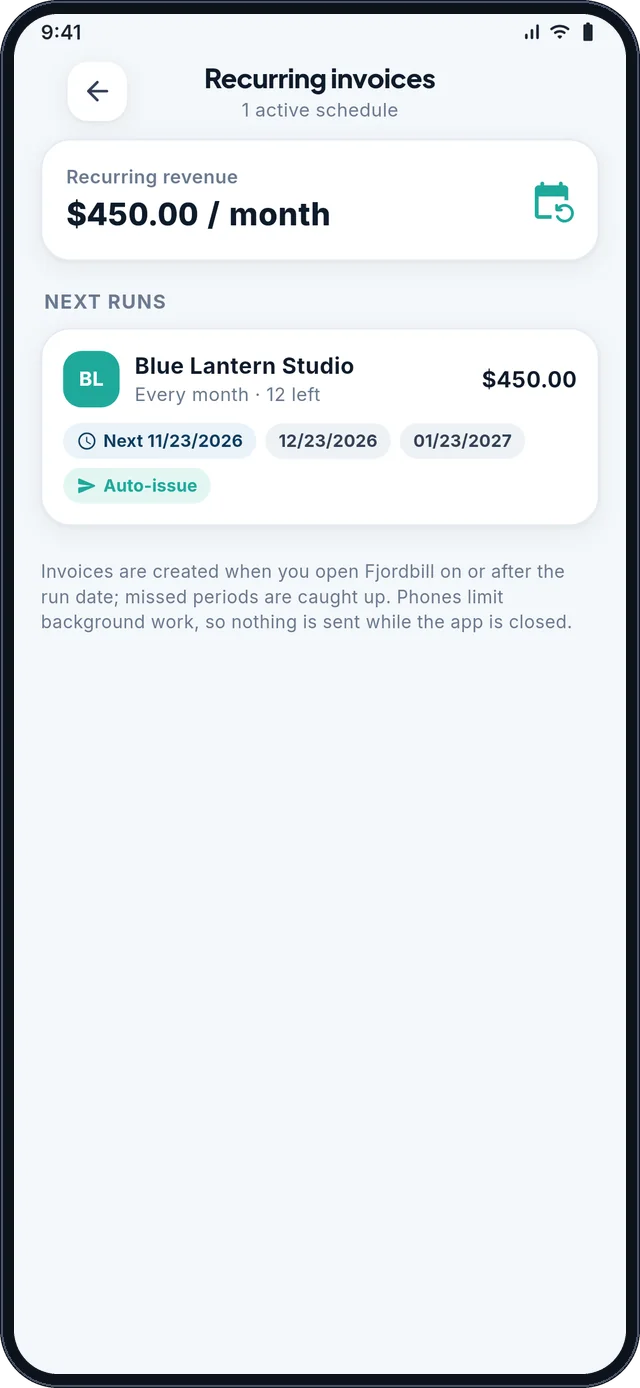
Bill retainers weekly, monthly, quarterly or yearly. Fjordbill creates a draft for you to check, or sends it automatically, and stops after a date or a set number of invoices.
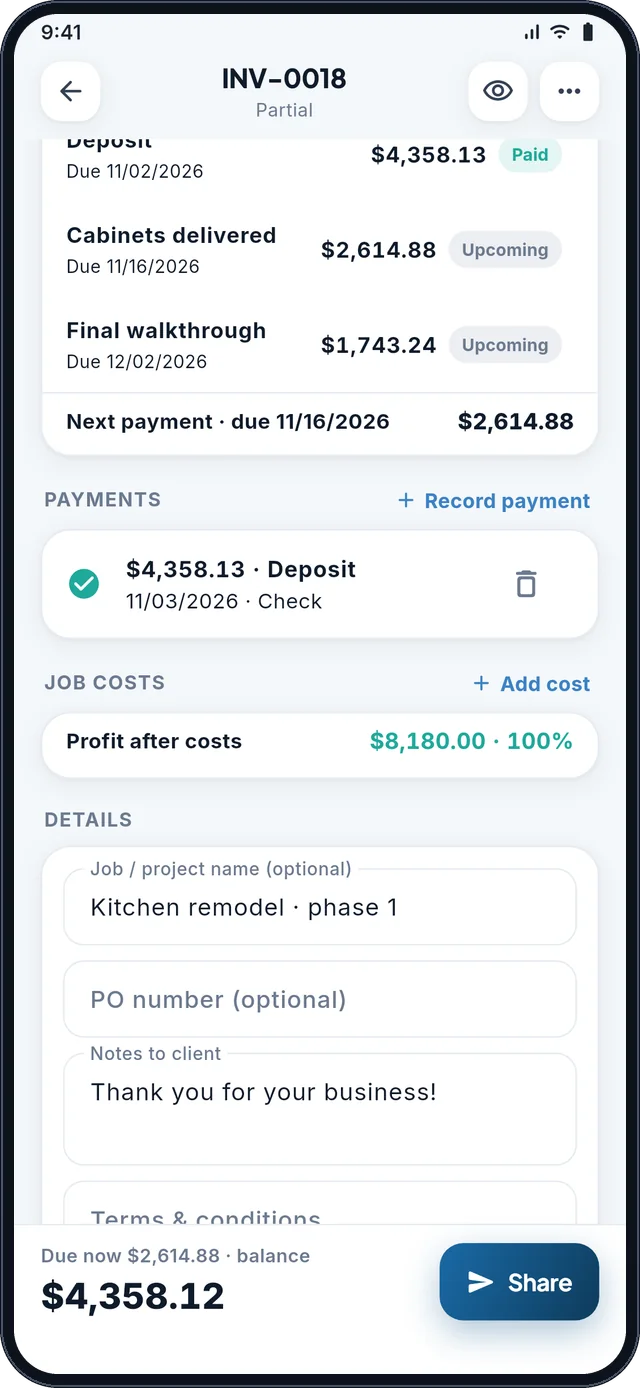
ProAsk for 50% upfront, or split a job into installments with their own due dates. The PDF shows what’s paid, what’s due now and the balance.
Free · 3+ installments ProSend an estimate with an approve link. When your client accepts, convert it to an invoice in one tap with every line kept.
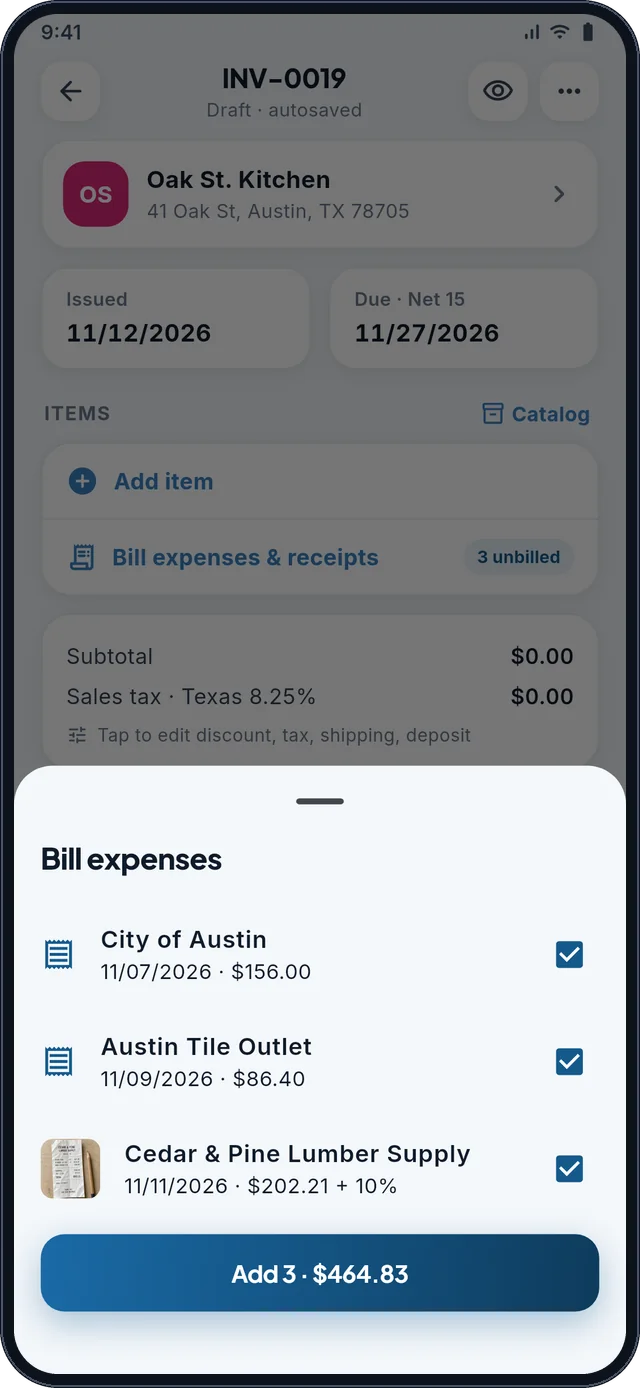
Convert free · approval links ProSnap a receipt, log the expense, and bill it to the client with an optional markup. Attach the receipt photos to the invoice PDF when the client wants proof.
Free · receipts on PDF ProSave a password-protected backup anywhere and restore it on a new phone. Pro keeps automatic encrypted backups on your device too.
Free · automatic backups ProSee what each client paid you in a year, with a CSV and PDF for your tax preparer. It totals what you recorded and is not tax advice.
ProHow it works
Add your name, logo, payment link and default sales tax rate. There’s no account to create and no email to verify.
Pick a client, add items from your catalog or a job timer, and let Fjordbill handle discounts, tax and deposits.
Share the PDF from your own email or messages. Your client pays with your link or by card, and the invoice is marked paid.
Know where you stand
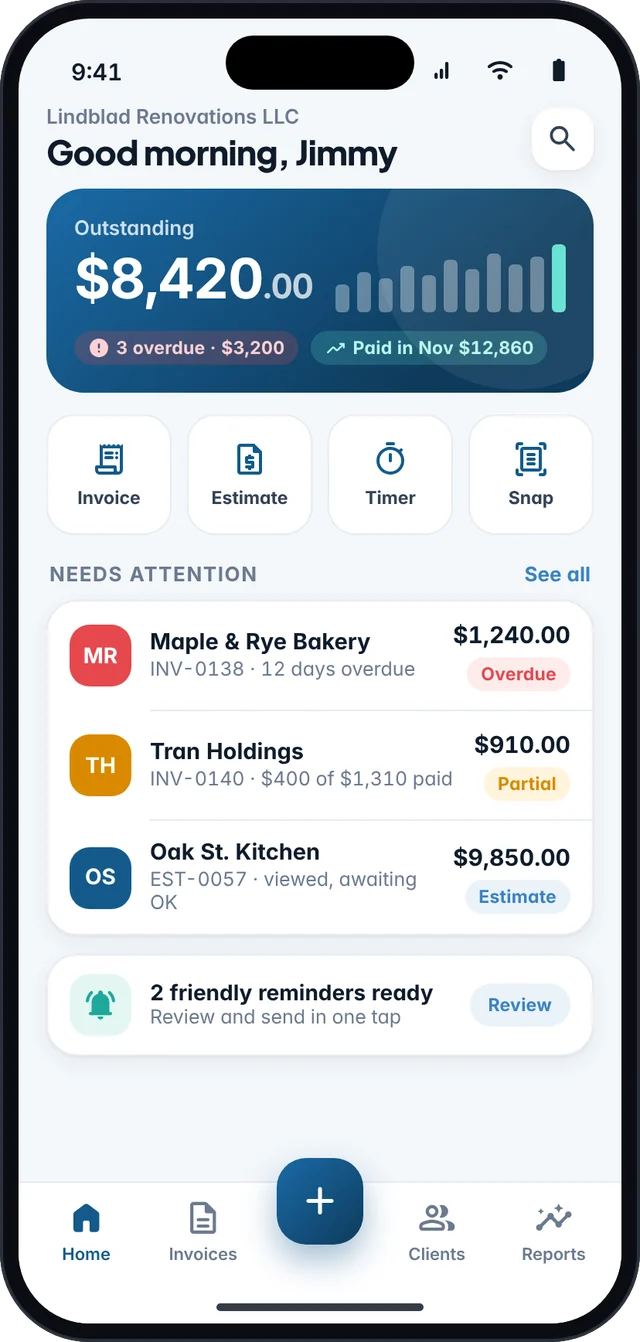
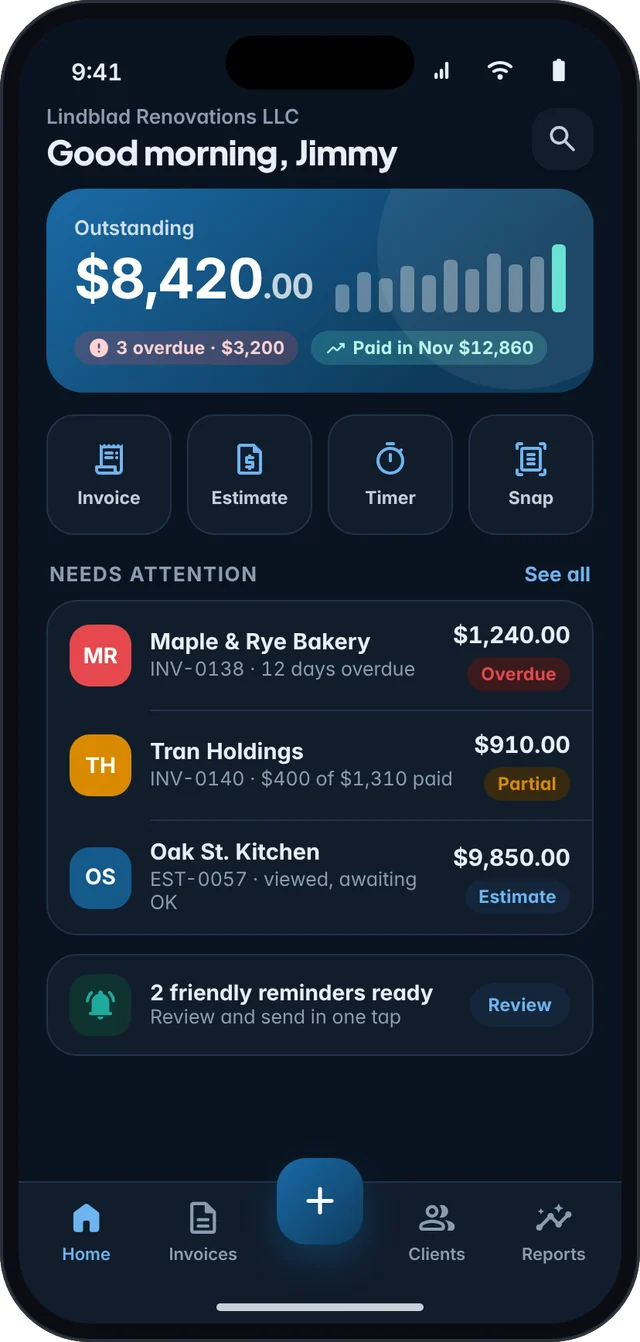
The dashboard shows what’s outstanding, what’s overdue and what was just paid. The invoices that need you are right at the top.
Built for jobs, not just line items
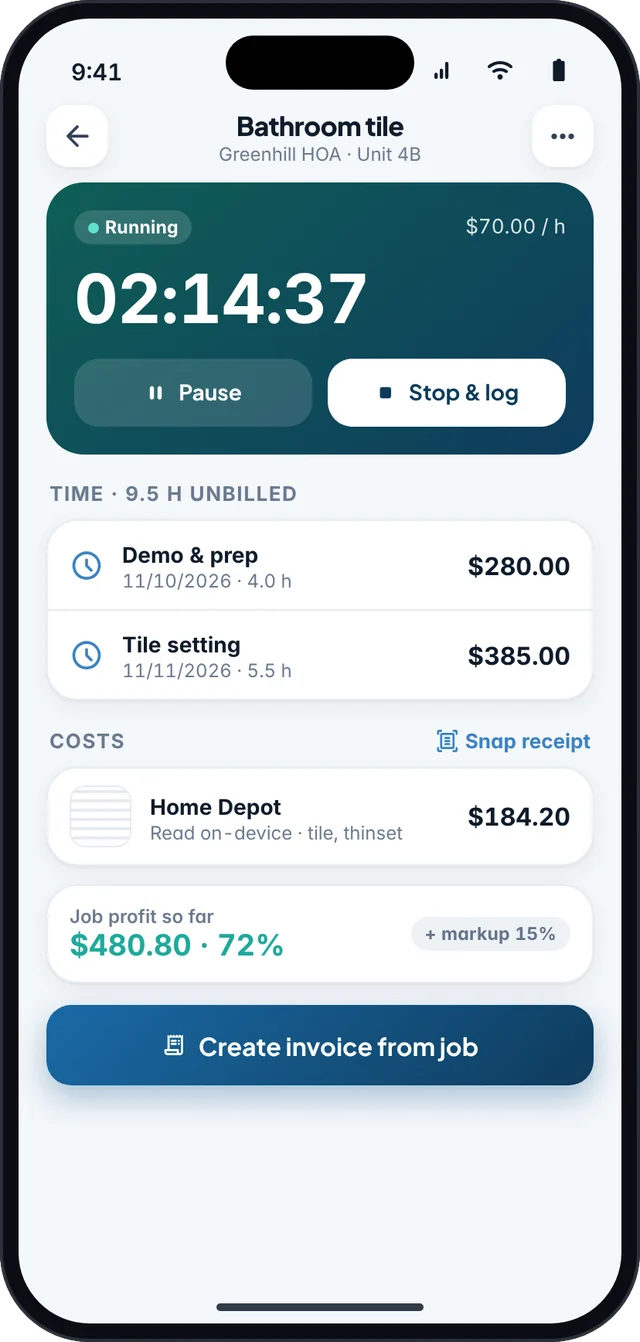
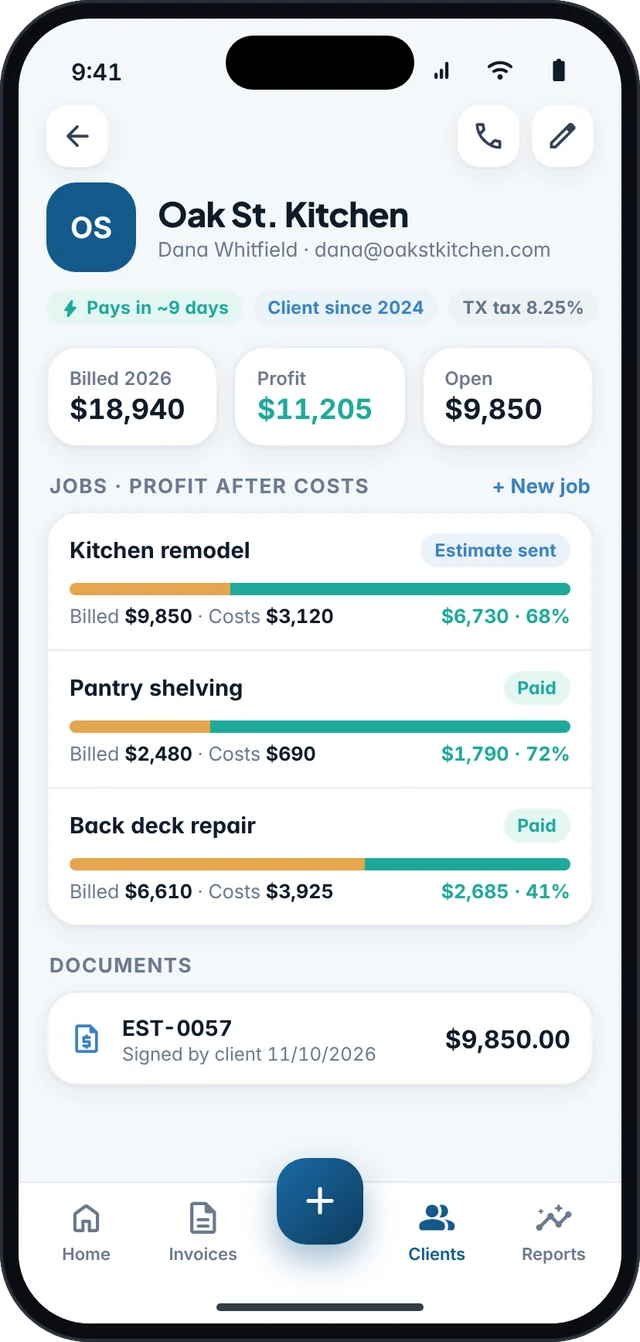
Run a job timer, log material costs and snap receipts. Fjordbill shows what each job billed, what it cost and what you actually kept.
Bill what you spend
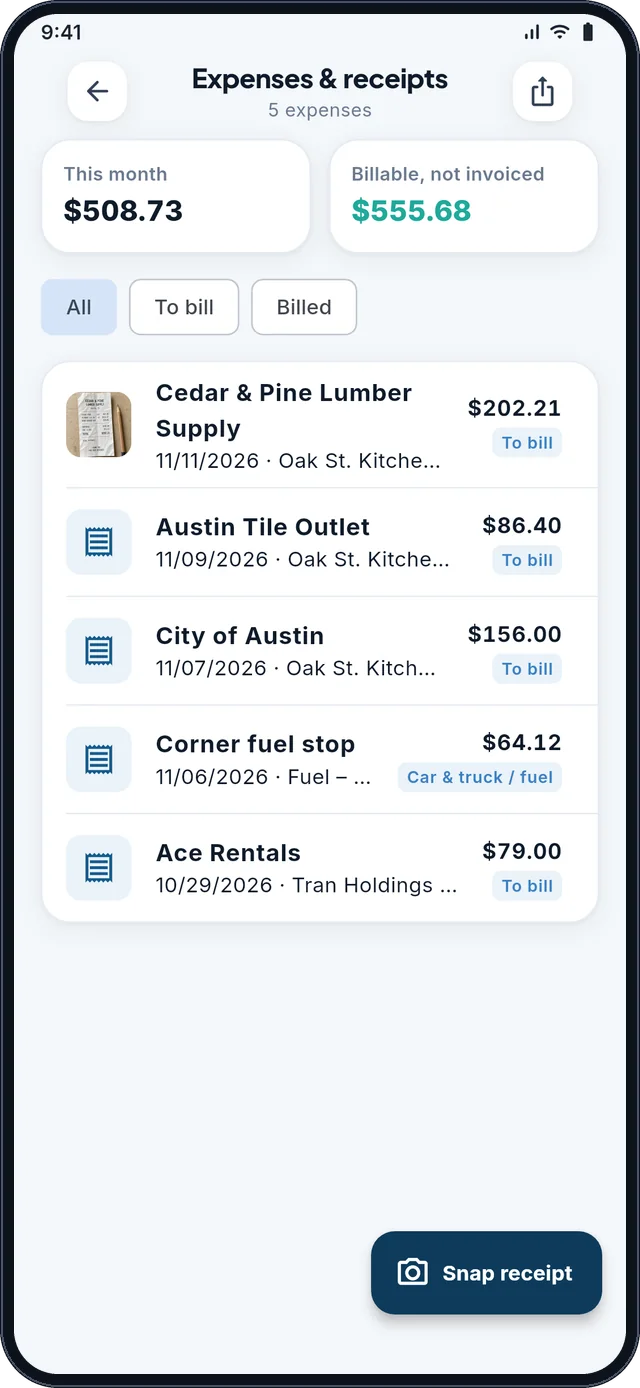
Snap the receipt at the store, pick the client, and it’s waiting the next time you invoice them. Add a markup for materials and attach the receipts to the PDF.
Get paid on bigger jobs
Split a remodel into a deposit, a progress payment and a final payment, or set a monthly retainer that bills itself. You always see what’s due next.
Works with your accounting software
Keep billing on your phone and your books where they are. Fjordbill saves import-ready CSV files in the layout each program’s own import tool expects, so there’s nothing to retype and no integration to sign up for.
Stripe is a trademark of Stripe, Inc. QuickBooks, Xero and Wave are trademarks of their respective owners. Fjordbill is not affiliated with or endorsed by them.

The companion app
SovereignLedger is our receipt scanner and Schedule C tax assistant for US sole proprietors. Export paid invoices from Fjordbill as income, then categorize expenses, estimate self-employment tax and quarterly payments, and read legal tax-planning tips with IRS sources.
SovereignLedger is not a CPA, Enrolled Agent or tax preparer, and it does not e-file with the IRS. The figures above are a worked example from 2026 IRS rates, not a promise of what you will save. Tips are general information, not tax advice. Coming soon to iPhone and Android.

Private by design
Fjordbill doesn’t run a cloud with your clients and invoices in it. Everything is stored on your device, and you decide what leaves it. If you turn on card payments, only the invoices you share are sent to create their pay links.
Create and edit invoices in a basement, on a roof or on a plane. No signal needed.
Nothing to sign up for and no password to lose. Open the app and start billing.
Protect the app with Face ID, your fingerprint or a PIN.
Export everything to CSV or an encrypted backup file at any time, on any plan.
Pricing
The free plan isn’t a trial: unlimited invoices, estimates and clients, for as long as you like.
Everything you need to send professional invoices.
$0forever
No card. No account.
Get notified at launchAutomation and polish for people who invoice every week.
$49.99per year
Just $4.17 a month, billed yearly.
Get notified at launchEverything in Free, plus:
Prices in US dollars. Pro is a subscription billed through the App Store or Google Play, and it renews automatically until you cancel in your store settings. If you stop paying, every invoice you created stays yours and can still be opened and exported.
Fjordbill is in development and will launch on the App Store and Google Play. Use the launch-notes form at the bottom of this page, or email [email protected], and we will write to you once it’s available.
No. Fjordbill runs entirely on your phone. There’s no sign-up and no password, and your clients don’t need an account to receive your invoices either.
Add your own payment link, such as a Stripe Payment Link, PayPal.me, Venmo or Cash App. It appears on your invoice as a link and a Pay-now QR code. You can also turn on online payments: your client gets a secure pay link, pays by card or bank transfer into your own Stripe account, and the invoice is marked paid automatically. Your own payment links carry no Fjordbill fee; built-in online payments have a small per-payment fee (see below).
Connect your own Stripe account from the app (it takes a few minutes, and Stripe verifies your business). Then each invoice you share gets a pay link. Your client pays by card, Apple Pay, Google Pay or US bank account on Stripe’s secure checkout, the money goes to your Stripe account, and Fjordbill marks the invoice paid when you open the app. Bank payments take up to 4 business days to clear. Fjordbill never holds your money. Online payments work on every plan and are rolling out after launch. Your Pro subscription is still billed only through the App Store or Google Play.
A platform fee per payment that depends on your plan: Free 1.00% for cards and 0.50% for US bank payments (max $10); Pro Monthly 0.40% for cards and 0.25% for bank (max $5); Pro Yearly 0.25% for cards and 0% for bank. The fee is deducted from the payment in your Stripe account and is never added to your client’s total. Stripe’s own fees are separate and paid to Stripe (standard US pricing: 2.9% + 30¢ per card payment, 0.8% per bank payment capped at $5). The app shows the fee before you turn payments on and a breakdown for every payment.
Yes, with Pro. Choose weekly, monthly, quarterly or yearly, pick whether Fjordbill should create a draft for you to review or send it automatically, and set an end date or a number of invoices. Fjordbill creates the invoices that are due each time you open the app, and the Recurring list shows the next run for each.
Yes. Ask for a deposit such as 50% upfront, or set a payment schedule with installments by percent or amount and their own due dates. The PDF shows what’s paid, what’s due now and the remaining balance. Deposits, partial payments and two-part schedules are free; three or more installments need Pro.
With Pro, an estimate can include an approve link. Your client can accept or decline with a note, and you see the answer in the app. Converting an accepted estimate into an invoice, with every line kept, is one tap on any plan.
Yes. Snap a receipt, log the expense and assign it to a client, with an optional markup. Next time you invoice that client, add the unbilled expenses in one tap. Logging expenses is free and you can bill up to 10 a month on the free plan; Pro removes the limit and can attach the receipt photos to the PDF. Expenses also export to SovereignLedger.
A Pro report that totals what each client paid you in a calendar year, as a CSV and a PDF to hand to your tax preparer. It only adds up payments you recorded in Fjordbill. It isn’t tax advice and isn’t a filed tax form, and amounts paid by card may be reported separately by the payment processor.
A private link you can send a client that lists every invoice and estimate you’ve shared with them, so they can pay or approve from one page. It’s a Pro feature, part of the online features rolling out after launch.
Set a default rate for your business, override it per client, and mark each line taxable or not. Discounts are applied before tax, and the PDF shows exactly what was taxed, for example “TX 8.25% on $3,032.78”. Reports show the sales tax you collected per rate. Fjordbill does the math, but it isn’t tax advice, so check the rates that apply to you.
Yes. You can create unlimited invoices, estimates and clients for free. Free PDFs carry a small “Made with Fjordbill” line in the footer, and Pro removes it.
Pro costs $7.99 a month or $49.99 a year, and both plans start with a 7-day free trial. It’s billed by Apple or Google, and you can cancel anytime in your App Store or Google Play subscription settings.
Nothing is locked away. Every invoice, estimate and client stays on your phone, and you can open, share and export them on the free plan.
Your data is stored on your device, not on our servers. On any plan, you can save a password-protected backup (AES-256 encryption) wherever you choose, such as iCloud Drive, Google Drive or your computer, and restore it on a new phone. Pro also keeps automatic encrypted backups on your device. If you use card payments or online links, only the invoices and estimates you share are stored on our server so your client can open them.
Yes. In Reports, tap “QuickBooks · Xero · Wave export”, pick a date range and choose all sent invoices or only paid ones. Fjordbill creates an import-ready CSV that follows each program’s own import format: the invoice import in QuickBooks Online, the sales invoice import in Xero, and the transactions upload in Wave. Step-by-step guides: QuickBooks, Xero, Wave.
No connection, login or contract is needed. Fjordbill never touches your accounting account; you simply import the file yourself, when you want. It works offline and is free on every plan. QuickBooks, Xero and Wave are trademarks of their respective owners, and Fjordbill is not affiliated with or endorsed by them.
SovereignLedger is our companion receipt scanner and Schedule C tax assistant for US sole proprietors. Fjordbill can export your paid invoices as income. SovereignLedger helps you categorize expenses, estimate self-employment tax and quarterly payments, and review legal tax-planning tips with IRS sources. It prepares a filing pack; it does not e-file with the IRS. It is coming soon to iPhone and Android, and it is not tax advice. See worked examples and sources.
Fjordbill is being built for iPhone and Android phones, with the same features on both.
Guides
Practical pages you can use before the apps are live. Tax articles cite IRS or other official sources and are not tax advice.
Line items, US sales tax, and a professional PDF, including offline.
InvoicingWhen freelancers may need to collect tax, and the five states with no statewide sales tax.
RecordsWhat to keep for your CPA, and the IRS 2026 Form 1099-NEC threshold.
RecordsClient paid by card but still sent a 1099-NEC? How to report it once, with IRS sources.
Tax recordsOfficial expense lines from the 2026 form, mapped to everyday freelancer costs.
Tax recordsOfficial IRS rates for 2026, including the mid-year revision, and a simple log.
Tax recordsHow to catch up on 2026 quarterly taxes before January 15, 2027, with IRS sources.
Both appsInvoice, export paid jobs, scan receipts, and walk into tax season with a packet.
Fjordbill is coming soon to iPhone and Android. Join the list for launch notes and occasional freelance billing tips.

